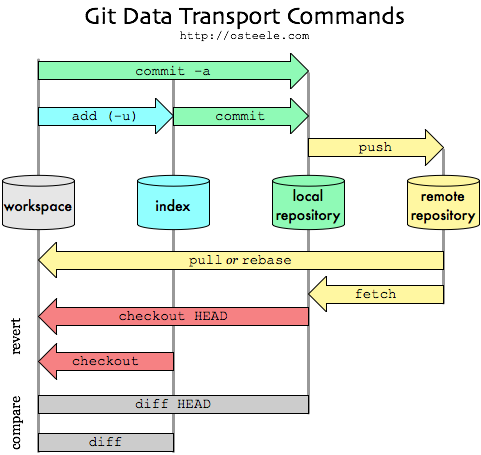
Commit
-a
使 Git 在提交前自動預存所有已追蹤的檔案,讓你略過 git add 步驟。
要小心提交了不想傳的檔案。
-m
選項後方直接輸入提交訊息
git commit -m ‘added new benchmarks’
commit 反悔
git reset HEAD^
預設 --mixed, commit 檔案回到 changes not staged for commit, Commit 拆出來的檔案會留在工作目錄,但不會留在暫存區
--soft : 工作目錄 暫存區 皆不變
--hard : 工作目錄 暫存區 皆丟掉
Checkout
復原修改檔案
git checkout — <file>…
Branch
依序是
1. 查看分支
2. 建立分支
3. -d 刪除分支
4. 需執行 checkout 命令以切換分支
5. checkout -b 可以同時建立分支和切換。
git branch
git branch branchname
git branch -d branchname
git checkout branchname
git checkout -b branchname
抓其他分支檔案
git checkout other_branch -- file.txt
Q. 已修改檔案(in workspace),但暫時要切換到其他分支。
A.
1. 先 commit 到目前分支,切回來後 git reset HEAD^ 拆回來繼續做。
2. git stash 暫存
要上傳新分支
$ push --set-upstream origin minrom
Stash
git stash
git stash list
git stash apply stash@{0}
git stash drop stash@{0}
# equal to
git stash pop stash@{2}
Fetch & Pull
fetch 會從遠端下載更新到 local repo,並且在本地端形成相對應的分支。
pull 除了更新到 local repo 同時會合併到 workspace。git pull 等於 fetch + merge。
remote
git remote -v
git remote set-url origin https://github.com/USERNAME/OTHERREPOSITORY.git
Untracking files
git rm --cached example.log
The above command will delete file example.log from tracking BUT not from your local file system.
GITWEB
gitweb 設定指令記錄
2035 sudo apt install gitweb
2040 cd proj/
2044 sudo mkdir gitweb
2048 sudo ln -s /proj/gerrit/review_site/git/lynx.git/ lynx.git
change projectroot to /proj/gitweb
2053 sudo vi /etc/gitweb.conf
gitweb apache config path
2058 cd /etc/apache2/
2060 vi conf-enabled/gitweb.conf
2070 sudo a2enmod cgi
2071 sudo service apache2 restart
2072 history
Reference

請先 登入 以發表留言。